
Introduction
Spring Boot 4 has been released last month! Considering all the new features it has, I decided to write about these features throughout the month of December. It will be an advent of Spring Boot 4 related tips!
Today’s new feature is Multi-Factor Authentication. Multi-Factor Authentication was introduced in Spring Security 7, and is thus also available when using Spring Boot 4.
The way Multi-Factor Authentication (or MFA) works in Spring Security is that there’s now a concept called FactorGrantedAuthority.
This FactorGrantedAuthority determines whether a user has authenticated through every factor your application requires (usually two).
As long as a user does not meet the required FactorGrantedAuthoritys, your user won’t be authenticated.
An example
Spring supports several authentication methods such as:
- A form-based login
- Basic authentication
- Passkeys
- A One-Time Token or OTT (not to be confused with a One-Time Password such as the ones you get with an authenticator app!)
- Your own authentication method (by implementing your own
AuthenticationProvider) - …
The way Spring’s Multi-Factor Authentication works is that you can combine multiple of these authentication methods together. For example, you could combine a form-based login with a One-Time Token (which usually requires access to your email), and thus implement 2FA/MFA.
To do this, we configure each factor we want to use, for example:
@Bean
SecurityFilterChain securityFilterChain(HttpSecurity http) {
    return http
        // ...
        .authorizeHttpRequests(requests -> requests.anyRequest().authenticated())
        .formLogin(Customizer.withDefaults())
        .oneTimeTokenLogin(Customizer.withDefaults())
        .build();
}
What’s new is that both these authentication methods will now give the user a FactorGrantedAuthority.
For example, once you log in with a form, you would get an authority with the name FACTOR_PASSWORD.
Once you log in with a One-Time Token, you get an authority with the name FACTOR_OTT.
The problem is that this won’t work right now.
That’s because the configuration allows you to log in with a password or with an OTT, but not with both.
To make these work together, we need to add a new annotation called @EnableMultiFactorAuthentication and tell it which authorities should be used as authentication factors:
@Configuration
// Add this
@EnableMultiFactorAuthentication(authorities = {
    FactorGrantedAuthority.PASSWORD_AUTHORITY,
    FactorGrantedAuthority.OTT_AUTHORITY
})
public class SecurityConfiguration {
    // ...
}
The new @EnableMultiFactorAuthentication annotation does two things.
First of all, it sets up all authentication filters so that they can work together instead of only allowing a single authentication method at a time.
It does this by setting setMfaEnabled() for all the authentication filters.
The second thing it does is to configure that all endpoints require both the FactorGrantedAuthority.PASSWORD_AUTHORITY and the FactorGrantedAuthority.OTT_AUTHORITY authorities.
Spring Security does this by setting up a new type of bean called an AuthorizationManagerFactory.
The equivalent code that’s being generated is:
@Bean
DefaultAuthorizationManagerFactory<?> mfa() {
    return AuthorizationManagerFactories
        .multiFactor()
        .requireFactors(FactorGrantedAuthority.PASSWORD_AUTHORITY, FactorGrantedAuthority.OTT_AUTHORITY)
        .build();
}
This AuthorizationManagerFactory basically has similar methods to when you use authorizeHttpRequests() (e.g. authenticated(), hasAuthority(), …).
The main difference is that if you’d call AuthorizationManagerFactory.hasAuthority(), it would check for the given authority AND the required factor authorities.
So, if you log in now, you first get the default login page showing both the password authentication and the OTT authentication method:
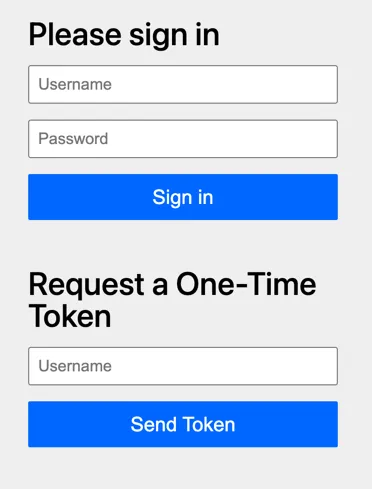
Note: Spring Security’s default form does not support “ordering” the authentication methods as far as I know. If this is something you’re looking for, you’ll need to write your own form pages.
Once you authenticate with username + password, it will only show the OTT authentication method:
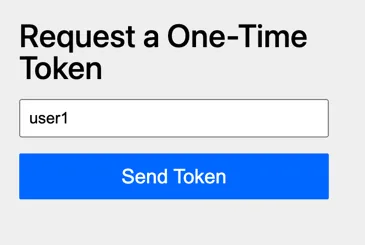
It’s also indicated in the URL that this authentication factor is missing, since the following query parameters are appended: factor.type=ott and factor.reason=missing.
After authenticating with the OTT as well, you are finally redirected to the homepage.
Fine-tuning the Multi-Factor Authentication
Spring Security also allows you to fine-tune the MFA process. For example, let’s say we only want to enable Multi-Factor Authentication on certain endpoints?
Well, in that case we no longer rely on the generated AuthorizationManagerFactory, and use our own instead.
To do this, we first need to pass an empty authorities to @EnableMultiFactorAuthentication so that it only sets up the authentication filters to support MFA:
@Configuration
// Note: We HAVE to provide an empty authorities array!
@EnableMultiFactorAuthentication(authorities = {})
public class SecurityConfiguration {
    // ...
}
After that, we can manually create an AuthorizationManagerFactory and manually call methods such as hasAuthority() within our security filter chain:
@Bean
SecurityFilterChain securityFilterChain(HttpSecurity http) {
    var mfa = AuthorizationManagerFactories
        .multiFactor()
        .requireFactors(FactorGrantedAuthority.PASSWORD_AUTHORITY, FactorGrantedAuthority.OTT_AUTHORITY)
        .build();
    return http
        .authorizeHttpRequests(requests -> requests
            .requestMatchers("/admin/**").access(mfa.authenticated())
            .anyRequest().authenticated())
        .formLogin(Customizer.withDefaults())
        .oneTimeTokenLogin(Customizer.withDefaults())
        .build();
}
So even though we didn’t change anything to the anyRequest() matcher, it will now only check whether the user has authenticated with a single factor.
This is because we no longer have any AuthorizationManagerFactory bean active.
Secondly, we do use the AuthorizationManagerFactory.authenticated() method for our /admin/** matcher.
This means that this endpoint requires Multi-Factor Authentication.
Conclusion
Spring Security’s new Multi-Factor Authentication makes it a lot easier to configure Multi-Factor Authentication. Personally, I don’t think I’ll use it though. I think that the best authentication is one you don’t write yourself, and that’s why I think that integrating an existing identity platform (e.g. Microsoft Entra, Auth0, …) is probably a better solution than shipping your own Multi-Factor Authentication.
This blogpost is a part of the Advent of Spring Boot 2025 series.